
Artificial Intelligence Studio
Ürün açıklamalarını, SEO metinlerini ve pazaryeri başlıklarını marka dilinizle yazdırın; yüzlerce ürünü toplu güncelleyin. Ürün fotoğraflarının arka planını değiştirin, mağazanızı 12 dile çevirin.
Audio narration · Click on the player for Turkish subtitles. CC button. The same steps are written and screenshotted below.
before you start
- ●Yapay zekâ yalnız ürün kartındaki bilgilerden yazar; ürün bilgisinde olmayan özellik, sertifika ya da sağlık iddiası uydurmaz. Ürün adını, markayı ve temel özellikleri doldurmanız sonucu iyileştirir.
- ●Aylık metin ve görsel hakkınız paketinize göre değişir; kalan hak toplu işlem ekranında yazar.
step by step
-
 Enlarge ⤢
1
Marka dilinizi belirleyin
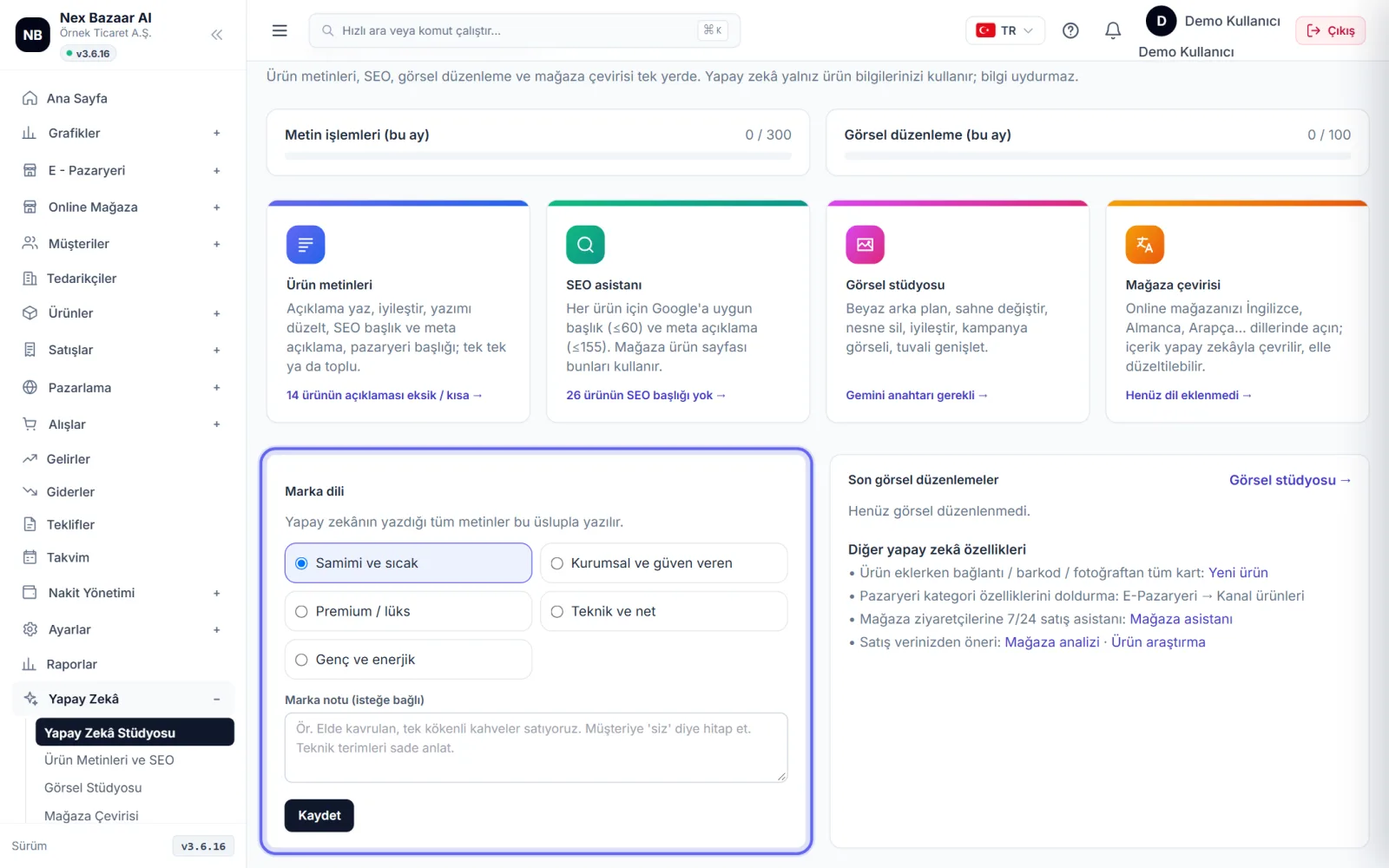
From the left menu Artificial Intelligence → Artificial Intelligence Studio. Brand languageChoose a tone from (e.g. friendly and warm, corporate and trusting, premium / luxury) and Brand noteDescribe your business in a sentence or two. All texts written by artificial intelligence are written in this style. Save.
-
 Enlarge ⤢
2
Alanın üstündeki ✦ menüsüyle metin yazdırın
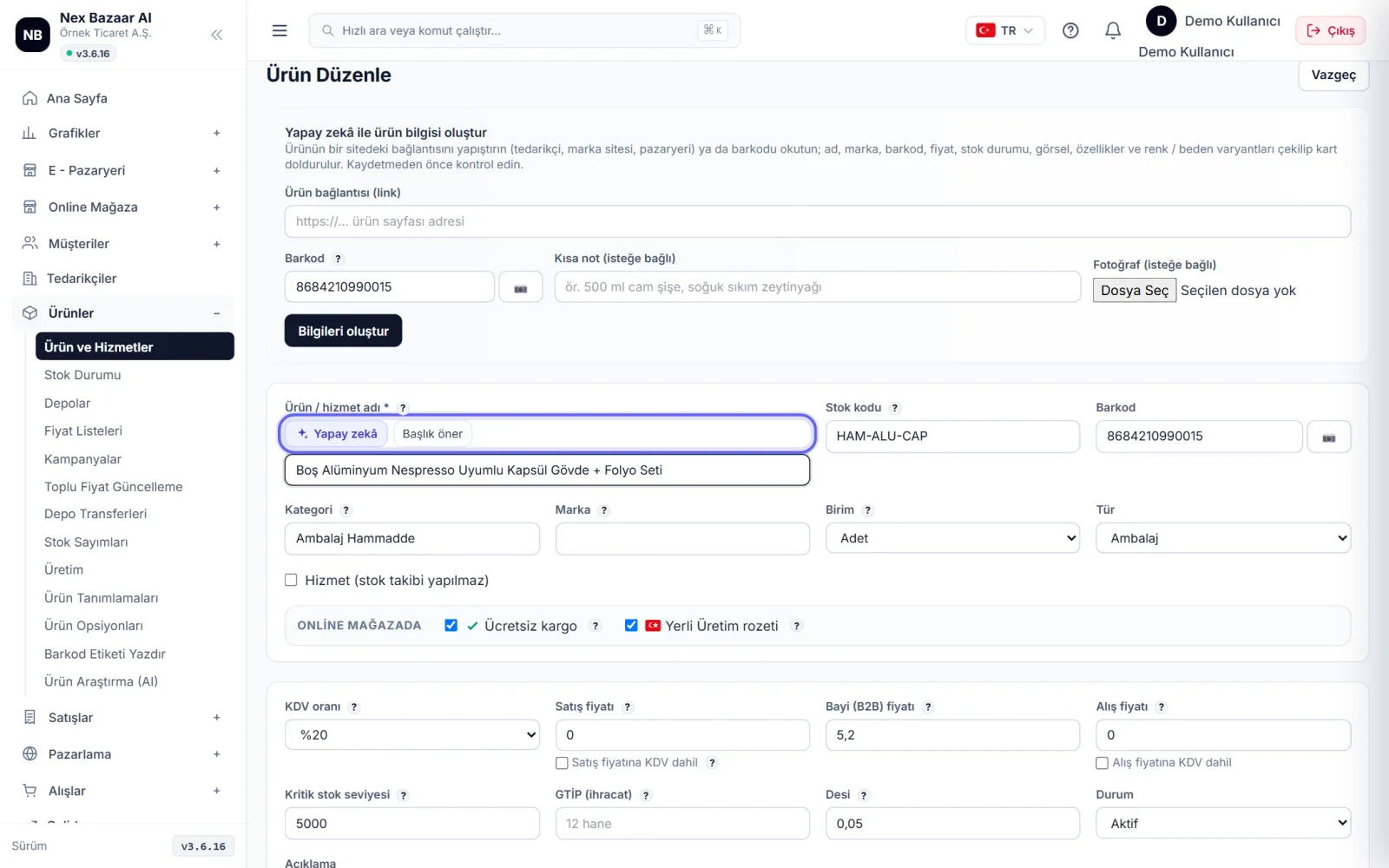
above the description field on the product card. ✦ Yapay zekâ menu: Write a description, Improve description, correct my spelling, Write item by item, shorten. In the product name field Suggest title suggests marketplace title. Suggestion Apply Put it in the field with; if you don't like Undo. Aynı menü blog yazısı ve mağaza mesajı yanıtlarında da vardır.
-
3
SEO başlığı ve açıklaması
on the product card Search engine (SEO) artificial intelligence in the department SEO title (en fazla 60 karakter) ve Meta description (en fazla 155 karakter) önerir. Online mağazadaki ürün sayfası Google'da bu metinlerle görünür; boşsa ürün adı ve açıklama kullanılır.
-
 Enlarge ⤢
4
Bulk product text
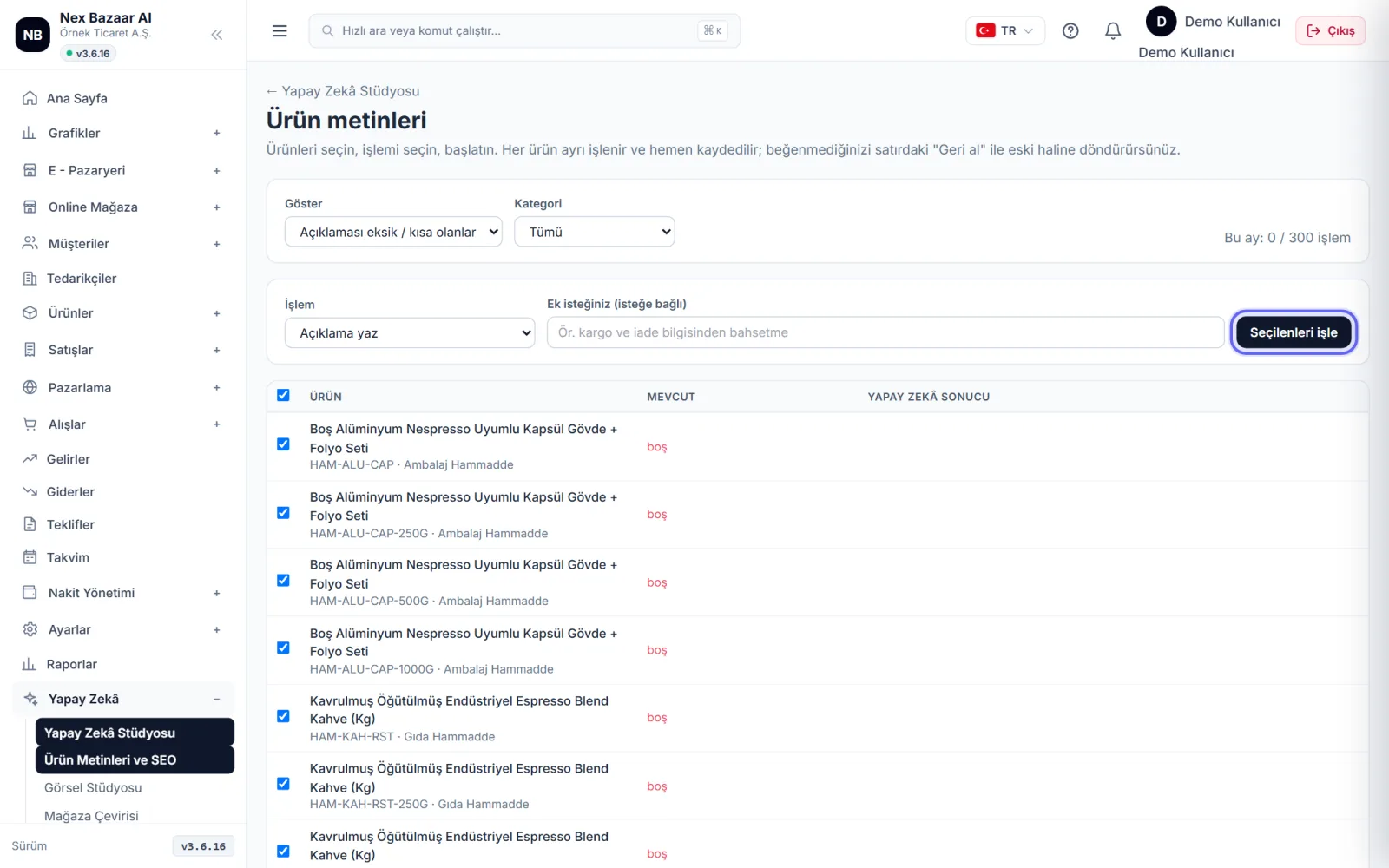
from the studio Product texts (toplu) ekranına geçin. Açıklaması eksik, SEO'su olmayan ya da tüm ürünleri ve kategoriyi süzün, işlemi seçin, isterseniz ek isteğinizi yazın (ör. "kargo ve iade bilgisinden bahsetme"), Process selected. Each product is processed sequentially and recorded immediately; previous text is stored, the next Undo returns with . stop ile istediğiniz an kesebilirsiniz.
-
 Enlarge ⤢
5
visual studio
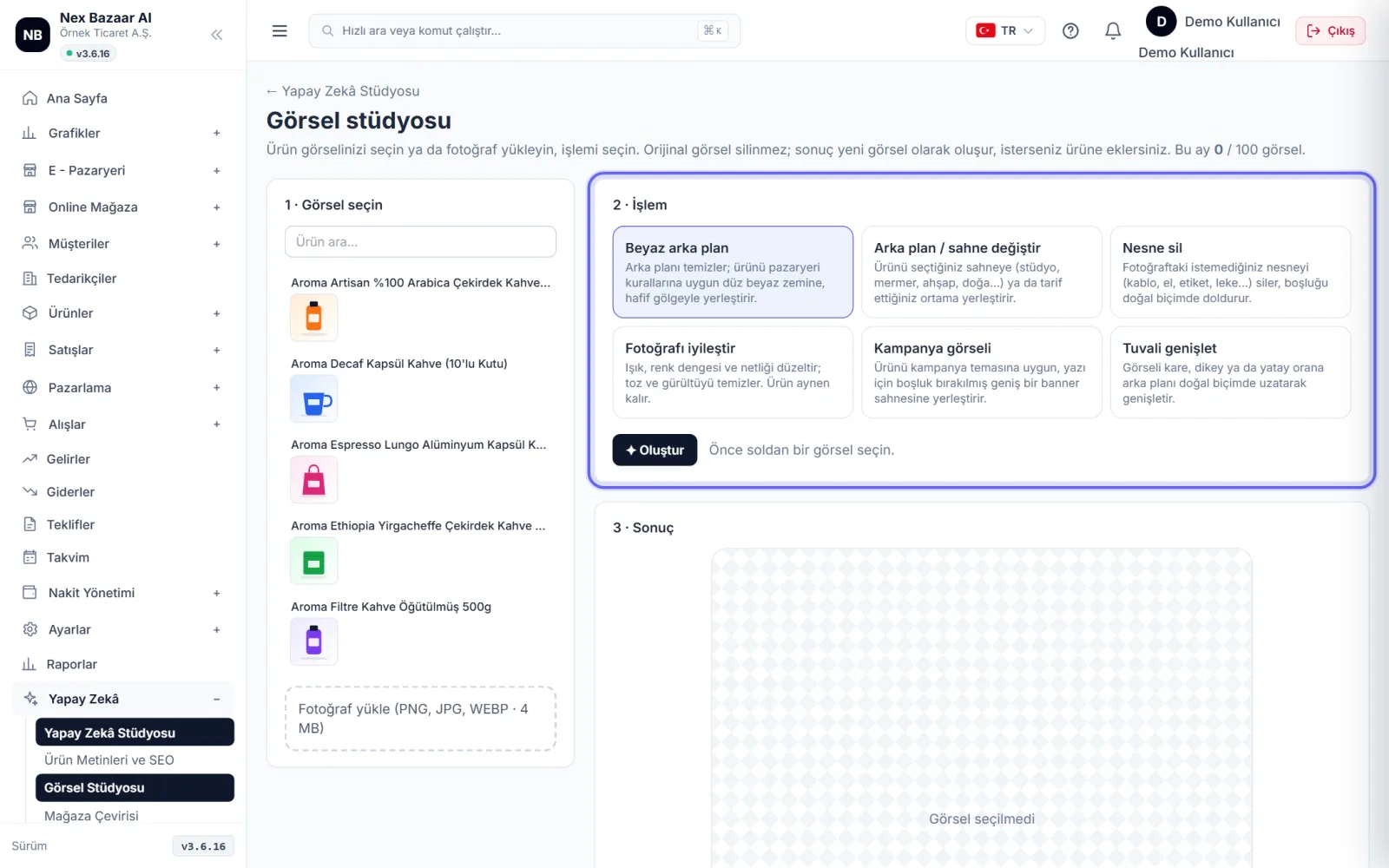
Visual studio →'nda 1 · Select image (upload store product image or photo), 2 · Process: white background, change background / scene, delete object, enhance photo, campaign image, expand canvas; ✦ Create. 3 · Result'ta önce / sonra karşılaştırıp Make main image, Add an additional visual to the product, replace original or Download. Orijinal görsel her zaman korunur.
-
 Enlarge ⤢
6
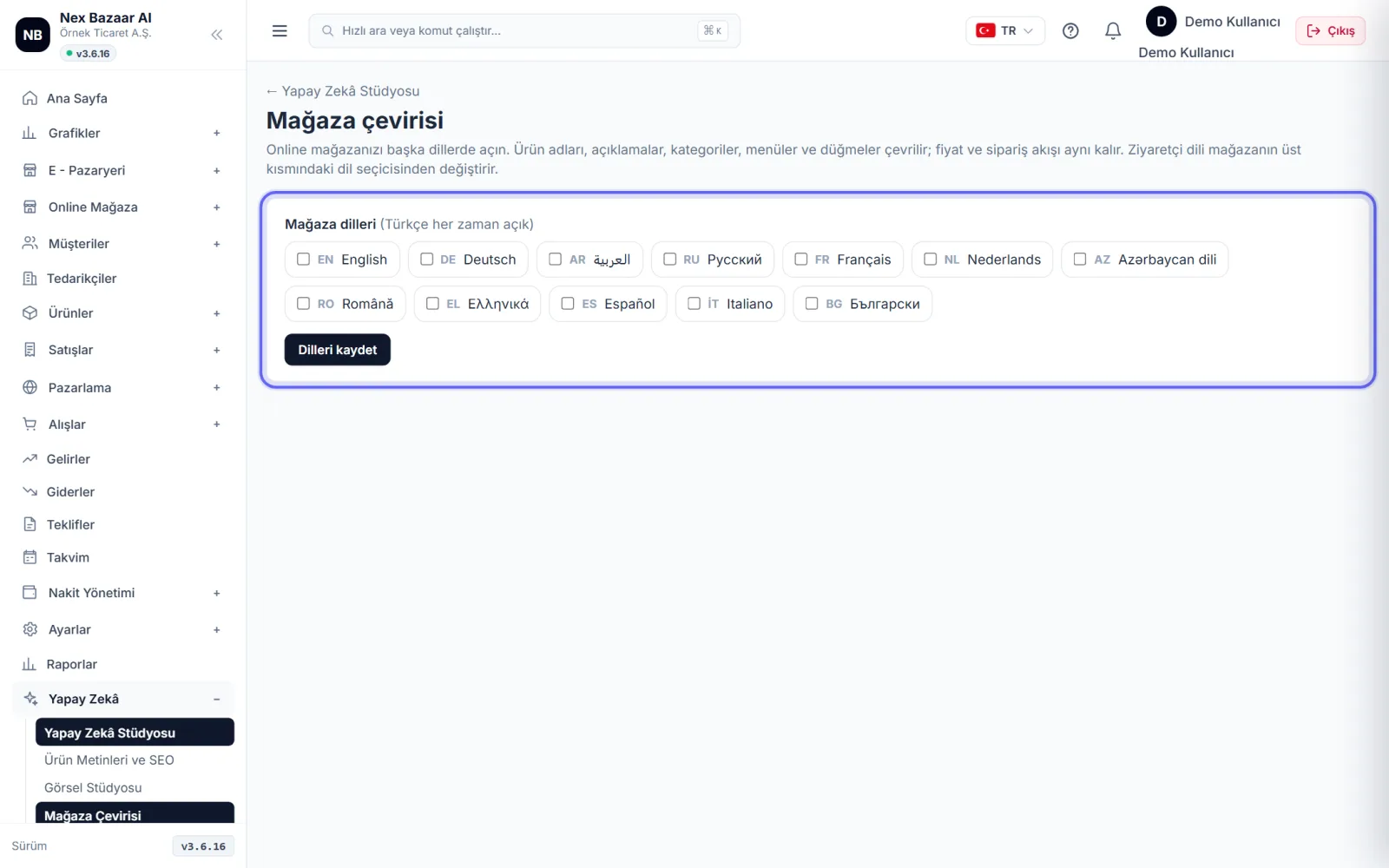
Translate the store into other languages
Store translation'nde dilleri seçip Save languages. Add products to list imports product names and descriptions into the translation list; ✦ Dial those waiting with artificial intelligence hepsini çevirir. Satırları elle düzeltebilirsiniz. Ziyaretçi mağazada sol alttaki dil seçiciden dili değiştirir; fiyat ve sipariş akışı aynı kalır.
-
7
Store assistant and sales analysis
Assistant who answers visitors' shipping, returns and product questions 24/7 in your online store Online Store → Artificial Intelligence Assistant'ndan yönetilir; gelen soruları orada görürsünüz. Stüdyodaki Store analysis extracts recommendations from your sales data, product research yeni ürün fikri araştırır.
Common problems
"Yapay zekâ henüz etkin değil" yazıyor+
The artificial intelligence service has not been opened on the platform side. Write to our WhatsApp support line or Support request.
The text is irrelevant to the product / appeared generic+
Name, brand, category and features are missing from the product card. Fill in the information and try again; Write details to the additional request in the batch.
Monthly allowance expired+
The right is renewed every month. For more, you can upgrade to the upper package (profile menu → My subscription and package).
Frequently asked questions
Does AI record text directly?+
Tek alanda öneri önce gösterilir, siz Apply deyince alana konur. Toplu işlemde metin hemen kaydedilir ama önceki hali saklanır ve geri alınabilir.
Does visual editing lose my text rights?+
No; Visual editing counts towards a separate monthly allowance.
How many languages can I translate into?+
12 languages; Arabic is displayed from right to left.